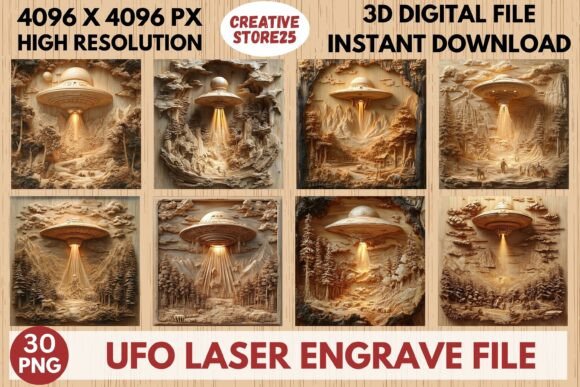
UFO Laser Engrave File: Premium Design for Precision Projects
Imagine adding a touch of cosmic intrigue to your next creative project with a single, powerful design asset. The UFO Laser Engrave File offers just that, providing a meticulously crafted, high-resolution PNG ready for laser engraving. This isn't just a simple image; it's a versatile digital tool designed to bring sharp, intricate detail to a wide array of materials and products, from wooden home décor to personalized fashion prints.
For creators and designers, having a reliable, high-quality design file is crucial for professional results. This specific file set is optimized for popular laser engraving software and machines like Lightburn, xTool, Glowforge, and CO₂ lasers. The grayscale detail is engineered to translate beautifully onto surfaces, ensuring clean lines and stunning depth. Whether you're creating standout signage, custom tableware, unique packaging, or textile art, this file provides a foundational element that elevates the entire piece.
Practical Applications for Your Creative Workflow
The true value of a design asset like this lies in its flexibility. Consider these practical use cases where a high-precision engrave file can streamline your process and enhance your output:
- Custom Merchandise & Décor: Engrave the UFO design onto coasters, cutting boards, wall art, or leather goods for a unique product line.
- Branding & Packaging: Incorporate the motif into labels, branded tags, or packaging for a sci-fi or novelty-themed brand identity.
- Event & Invitation Design: Use the engraved effect on invitations, party favors, or event signage for themed celebrations.
- Fashion & Textiles: Apply the design to denim, tote bags, or hats for personalized apparel with a textured, professional finish.
When selecting any digital design asset, it's important to consider its compatibility and quality. This file set includes multiple PNG versions with transparent backgrounds, allowing for easy integration into your existing design software. Since it's not an editable vector file, you'll need to resize it appropriately for your specific product dimensions—a standard step in most digital design workflows. Always verify that your laser machine's software can handle high-resolution PNG files before starting a project.
Choosing and Using Design Assets Effectively
Integrating a new design element should feel seamless. Here are a few tips for making the most of premium files like this one:
- Test First: Run a small test engrave on a scrap piece of your intended material to dial in power and speed settings.
- Consider the Material: The same file will engrave differently on wood, acrylic, leather, or stone. Adjust your approach accordingly.
- Font Pairing & Composition: If you're adding text, pair the intricate UFO design with a clean, simple sans-serif font or a bold display typeface to maintain readability and balance.
- License Clarity: Always review the usage license to ensure it covers your intended application, especially for commercial products.
Ultimately, the right digital download acts as a catalyst for creativity. It saves time on initial design labor and provides a polished starting point that can be customized to fit a specific vision. A well-executed asset, whether it's a creative font, a vector illustration, or a laser-ready engrave file, contributes to visual consistency and a more professional presentation. By choosing thoughtfully crafted resources, you invest in the quality and uniqueness of your final product, ensuring it stands out in a crowded marketplace.
Exploring new design assets is about finding those pieces that spark ideas and solve practical challenges. A versatile, high-resolution file offers a solid foundation for countless projects, helping you deliver consistent, high-quality results that impress clients and end-users alike.